Week-6 Assignment: SQL Data Definition Language
Panurut Sirinapaisan 65070501083 Section B
Show the database
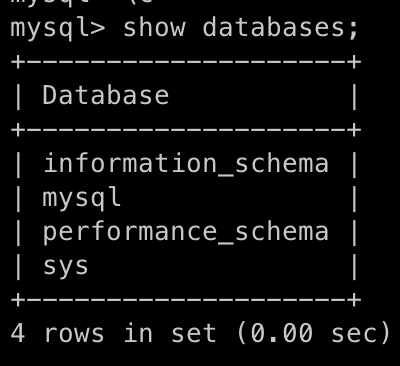
Show the database that I have using command SHOW DATABASES; to show all databases that I have.
Result :
Create database named 'Conference'
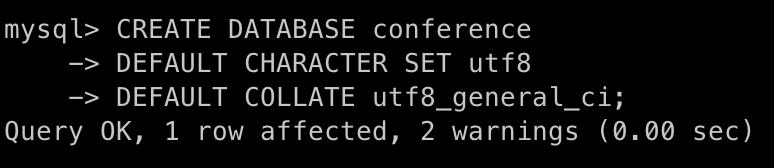
So,I created the database named Conference with utf-8 characters using command
CREATE DATABASE conference
DEFAULT CHARACTER SET utf8
DEFAULT COLLATE utf8_general_ci;
Command Execute :
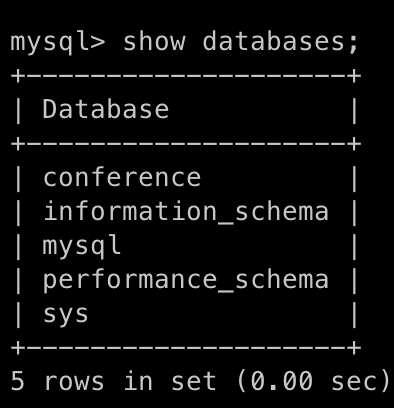
Result :
Create table
Select database
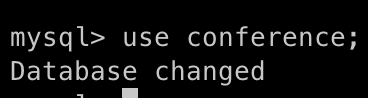
Using command USE DATABASE; to select the database that will operate.
USE conference;
Result :
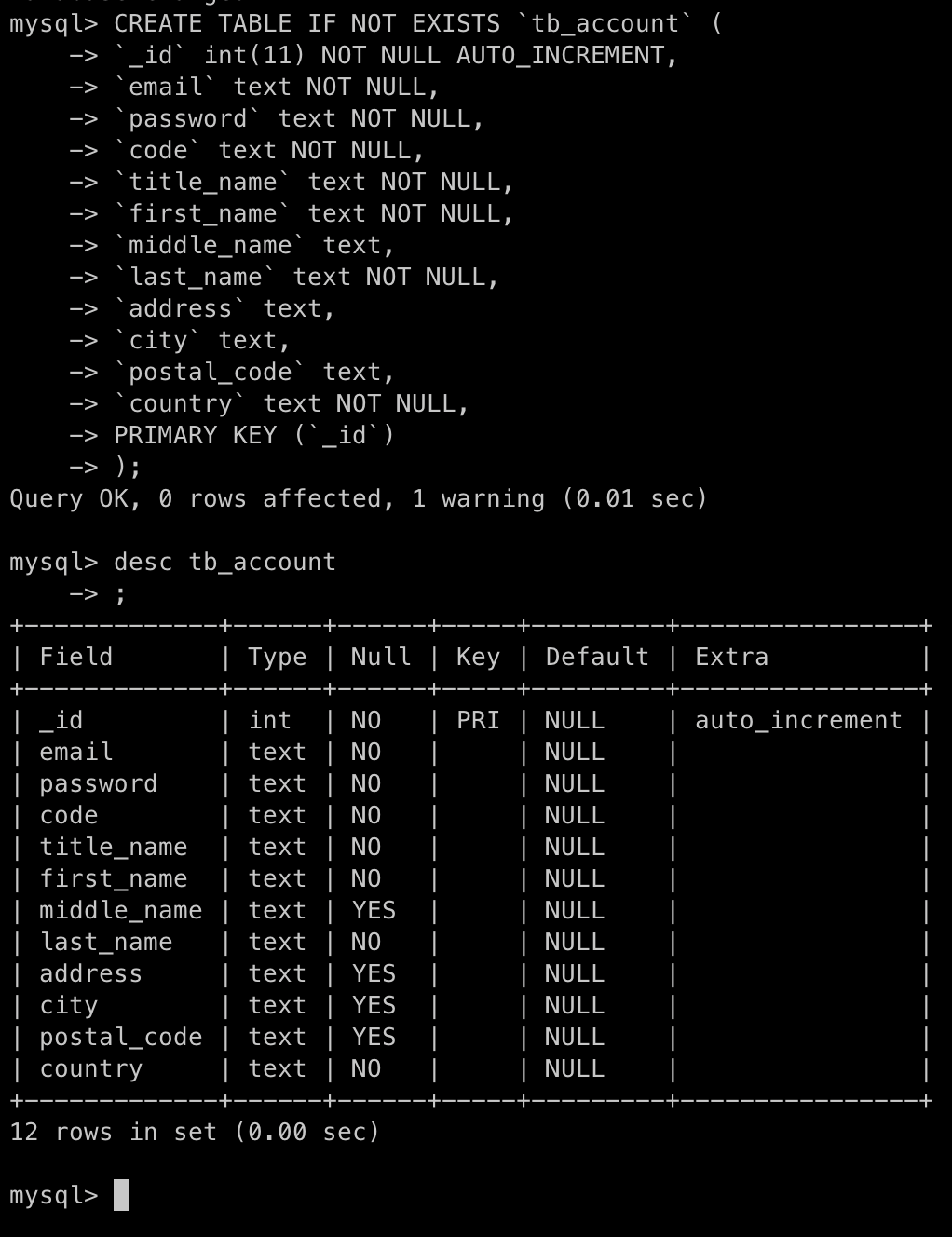
Create table named 'tb_account'
Create a new table named tb_account using command create table table_name();
CREATE TABLE IF NOT EXISTS `tb_account` (
    `_id` int(11) NOT NULL AUTO_INCREMENT,
    `email` text NOT NULL,
    `password` text NOT NULL,
    `code` text NOT NULL,
    `title_name` text NOT NULL,
    `first_name` text NOT NULL,
    `middle_name` text,
    `last_name` text NOT NULL,
    `address` text,
    `city` text,
    `postal_code` text,
    `country` text NOT NULL,
PRIMARY KEY (`_id`)
);
Using command DESC TABLE_NAME; for showing the attributes of table;
DESC tb_account;
Result :
Change attribute name
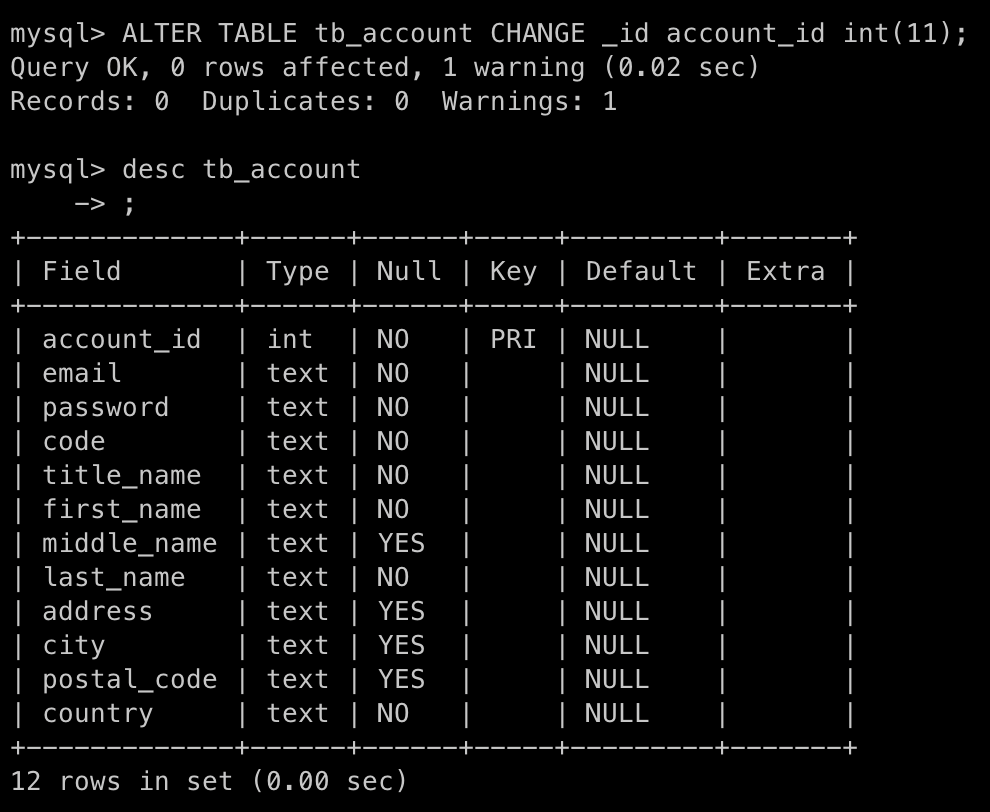
Change attribute named _id to account_id using command
ALTER TABLE `tb_account` CHANGE `_id` `account_id` int(11);
Result :
Create table named 'tb_paper'
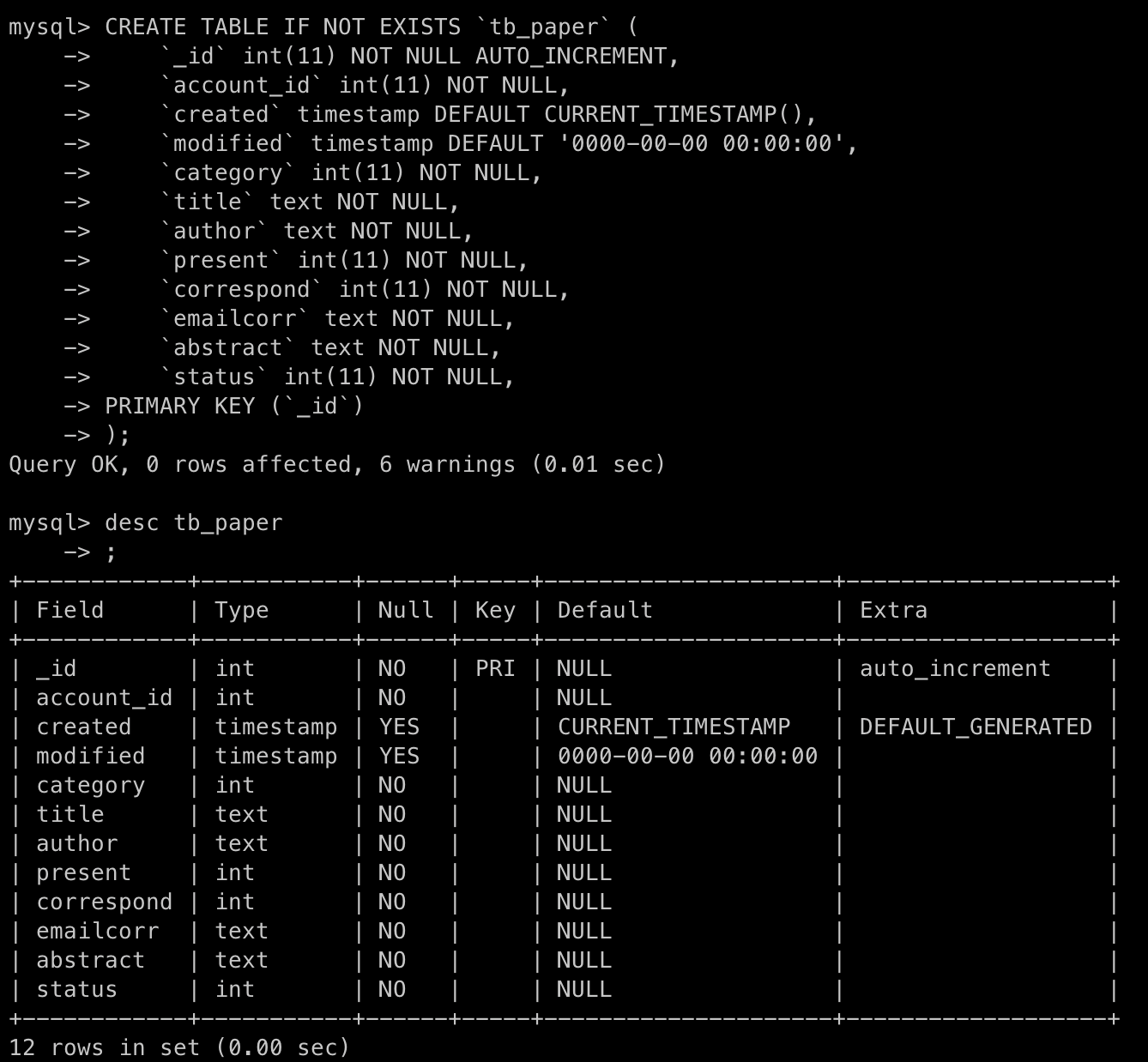
Create a new table named tb_paper using command create table table_name();
CREATE TABLE IF NOT EXISTS `tb_paper` (
`_id` int(11) NOT NULL AUTO_INCREMENT,
`account_id` int(11) NOT NULL,
`created` DEFAULT CURRENT_TIMESTAMP(),
`modified` DEFAULT '0000-00-00 00:00:00',
`category` int(11) NOT NULL,
`title` text NOT NULL,
`author` text NOT NULL,
`present` int(11) NOT NULL,
`correspond` int(11) NOT NULL,
`emailcorr` text NOT NULL,
`abstract` text NOT NULL,
`status` int(11) NOT NULL,
PRIMARY KEY (`_id`)
);
Result :
Change attribute name
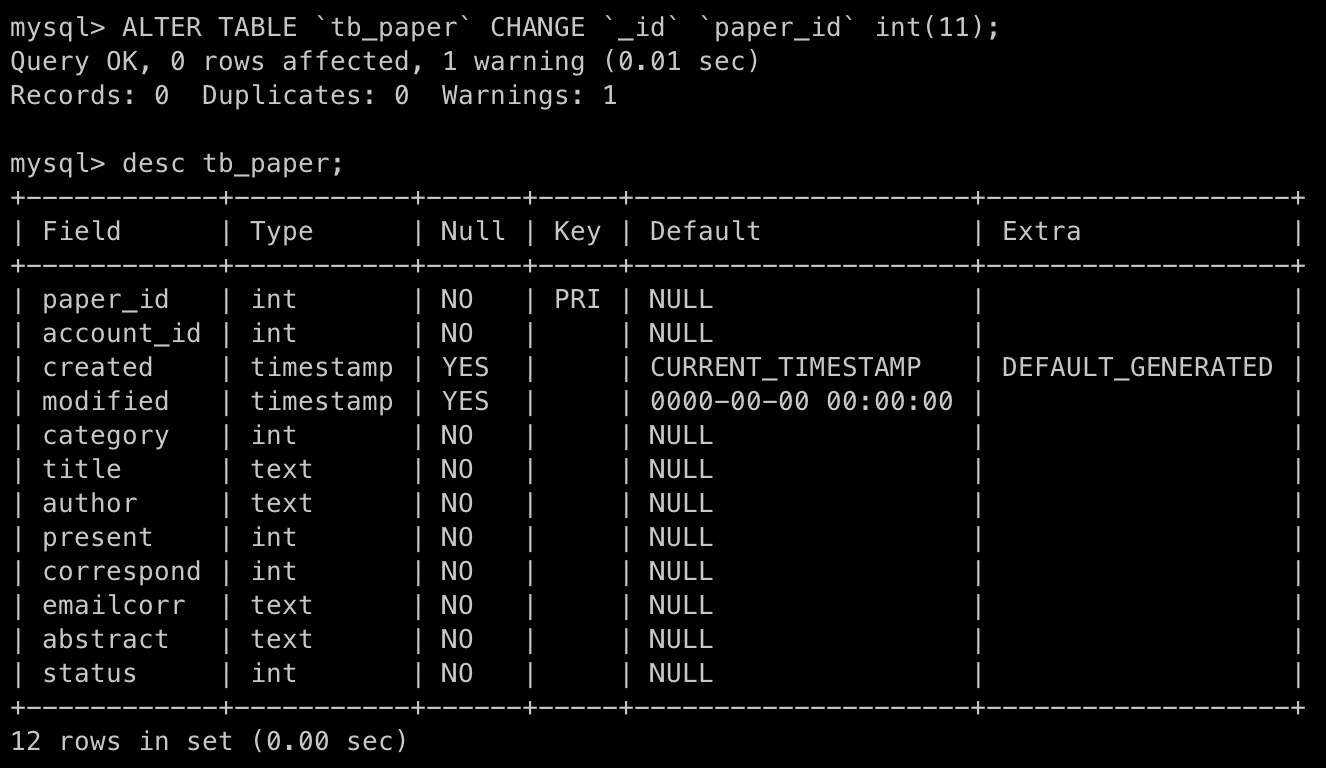
Change attribute named _id to paper_id using command
ALTER TABLE `tb_paper` CHANGE `_id` `paper_id` int(11);
Result :
Add new primary key
Add attribute named account_id to primary key using command
ALTER TABLE tb_paper ADD PRIMARY KEY (account_id);
So, It cannot add new primary key because each table must have only one primary key so the primary key in this table named tb_paper has define in attributes named paper_id .
Result :

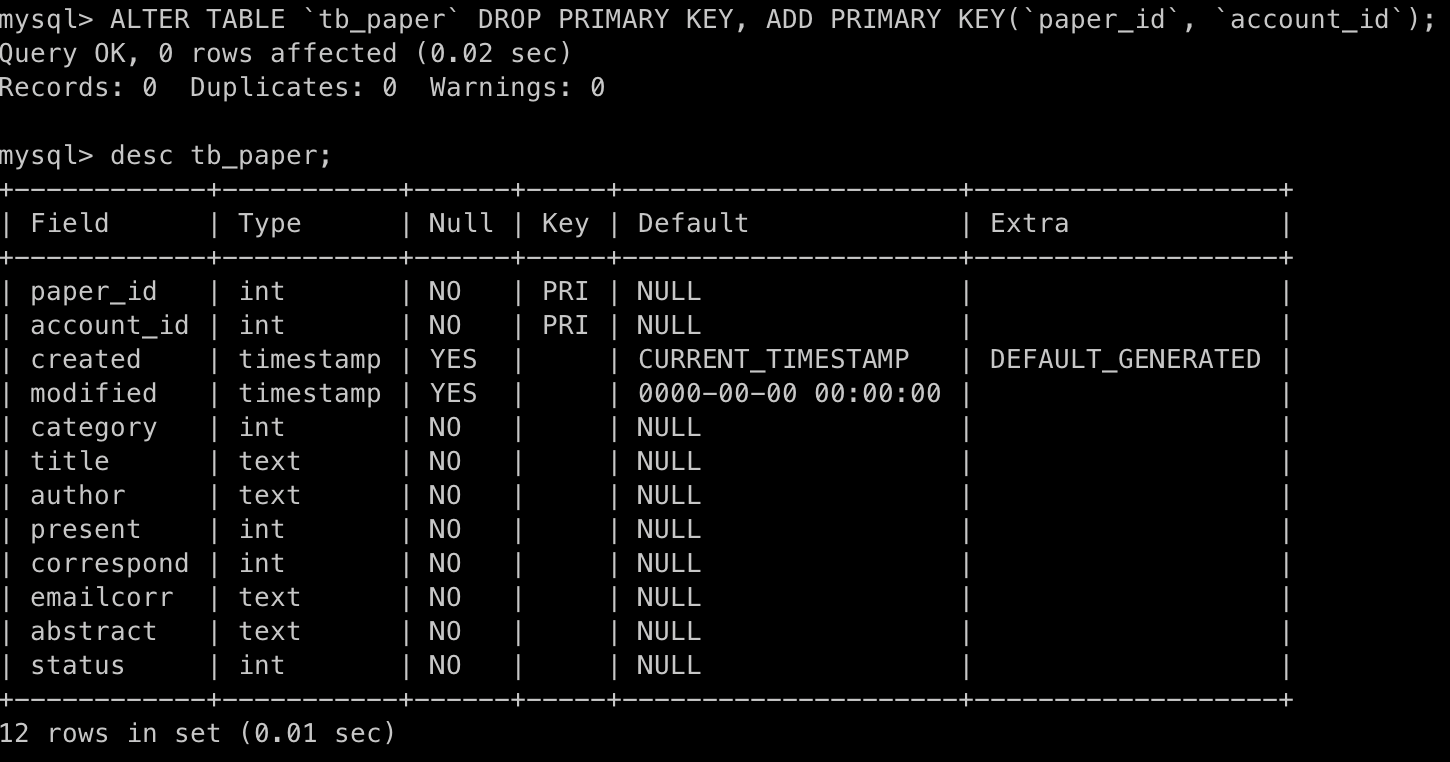
ALTER TABLE `tb_paper` DROP PRIMARY KEY,
ADD PRIMARY KEY(`paper_id`, `account_id`);
If we should to remove primary key that define in the table first, then add a new primary key to the table.
So, the ALTER TABLE command above it will drop primary key at attribute paper_id that in table tb_paper and then define the new primary key using composite key(paper_id, account_id).
Result :
Show Columns
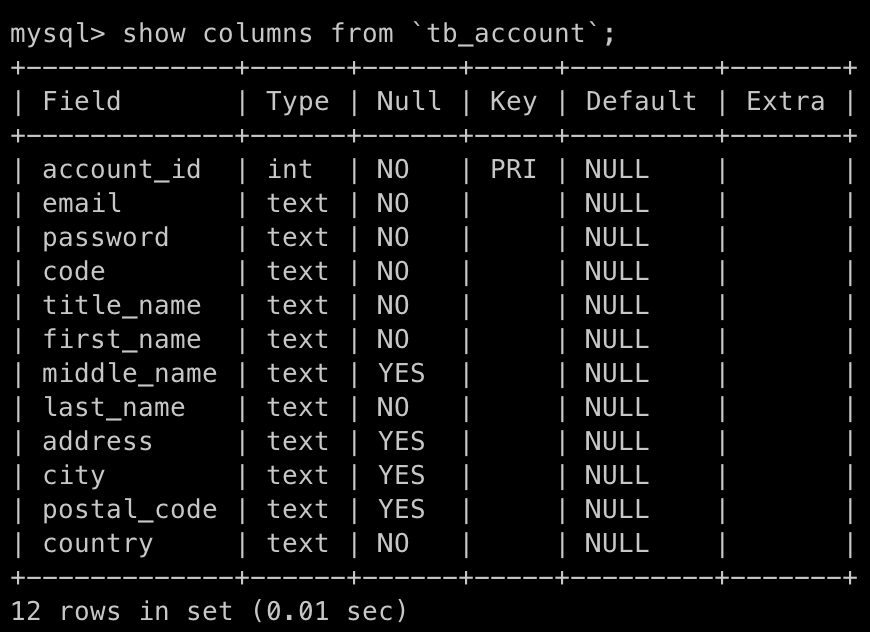
Show columns in 'tb_account'
Using command show columns from table_name to show list of columns in the table named table_name
SHOW COLUMNS FROM `tb_account`;
Result :
Show columns in 'tb_paper'
Using command show columns from table_name to show list of columns in the table named table_name
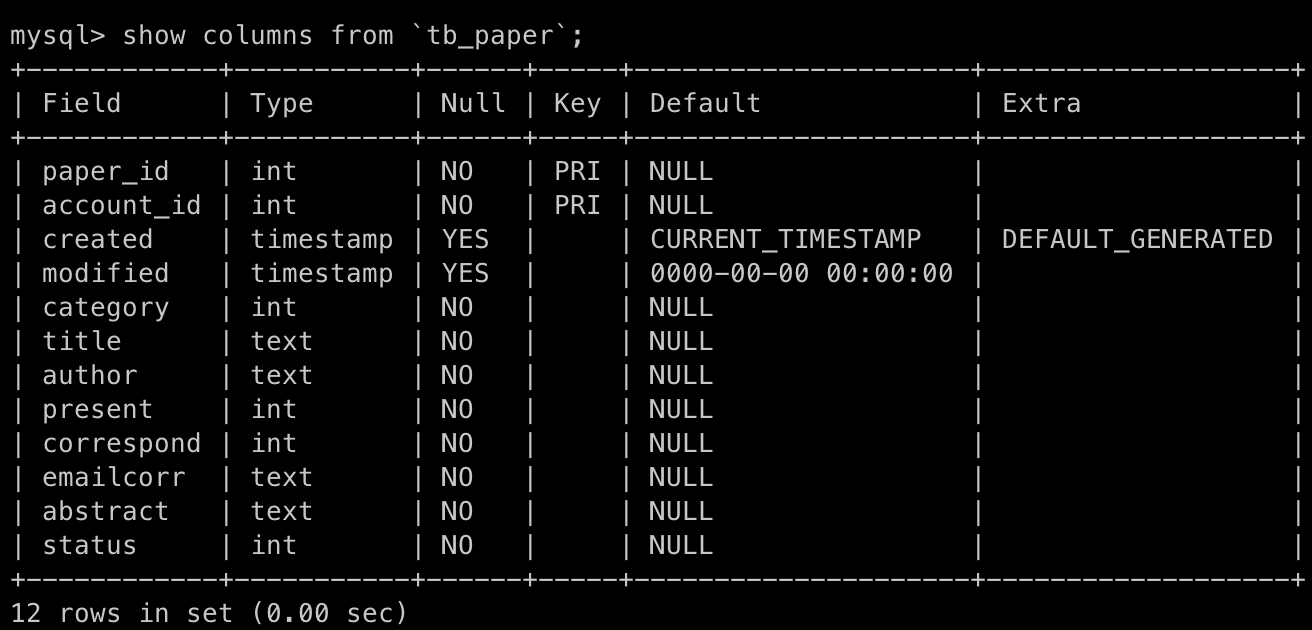
SHOW COLUMNS FROM `tb_paper`;
As you can see in the picture below, you can see the primary key of table named tb_paper it have 2 primary key are in attributes named paper_id and account_id.
Result :
Alter table command
Drop columns
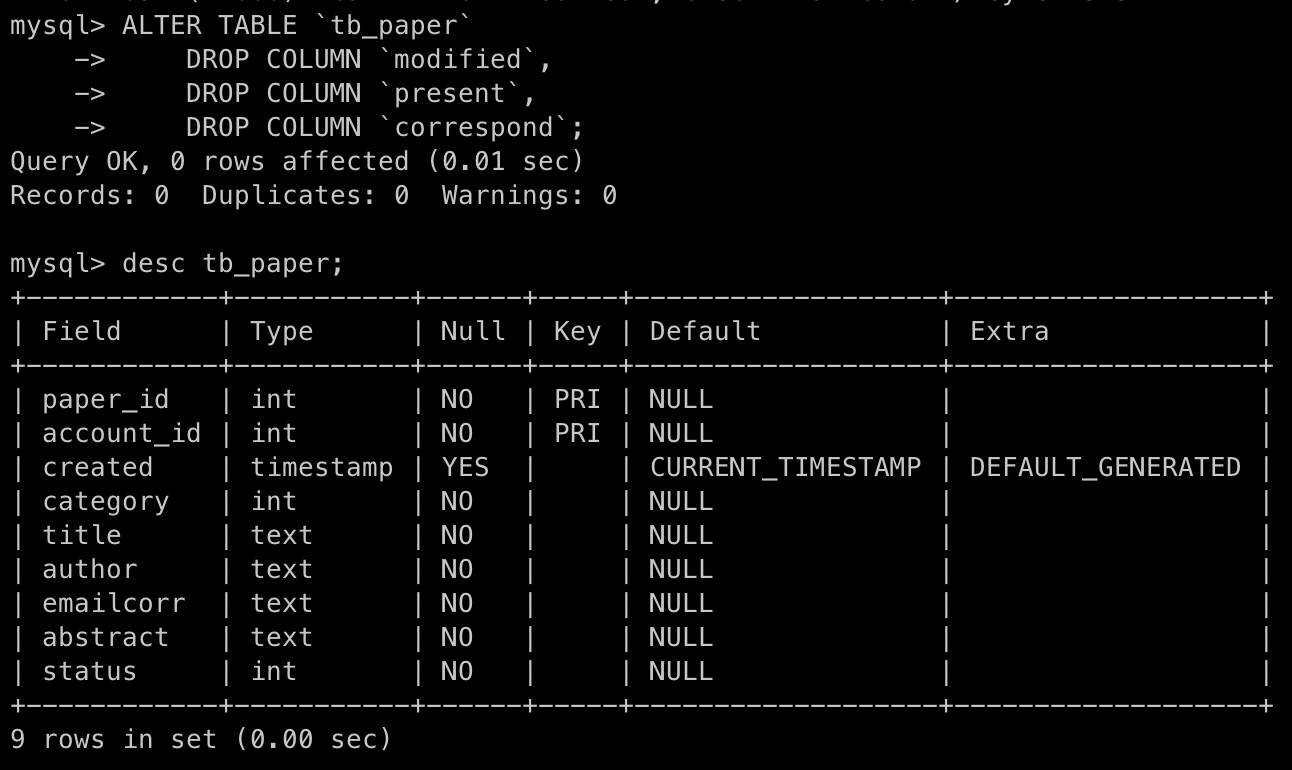
We need to delete the columns named modified,present,correspond in the table named tb_paper using command
ALTER TABLE `tb_paper`
    DROP COLUMN `modified`,
    DROP COLUMN `present`,
    DROP COLUMN `correspond`;
Result :
Change datatype of attributes
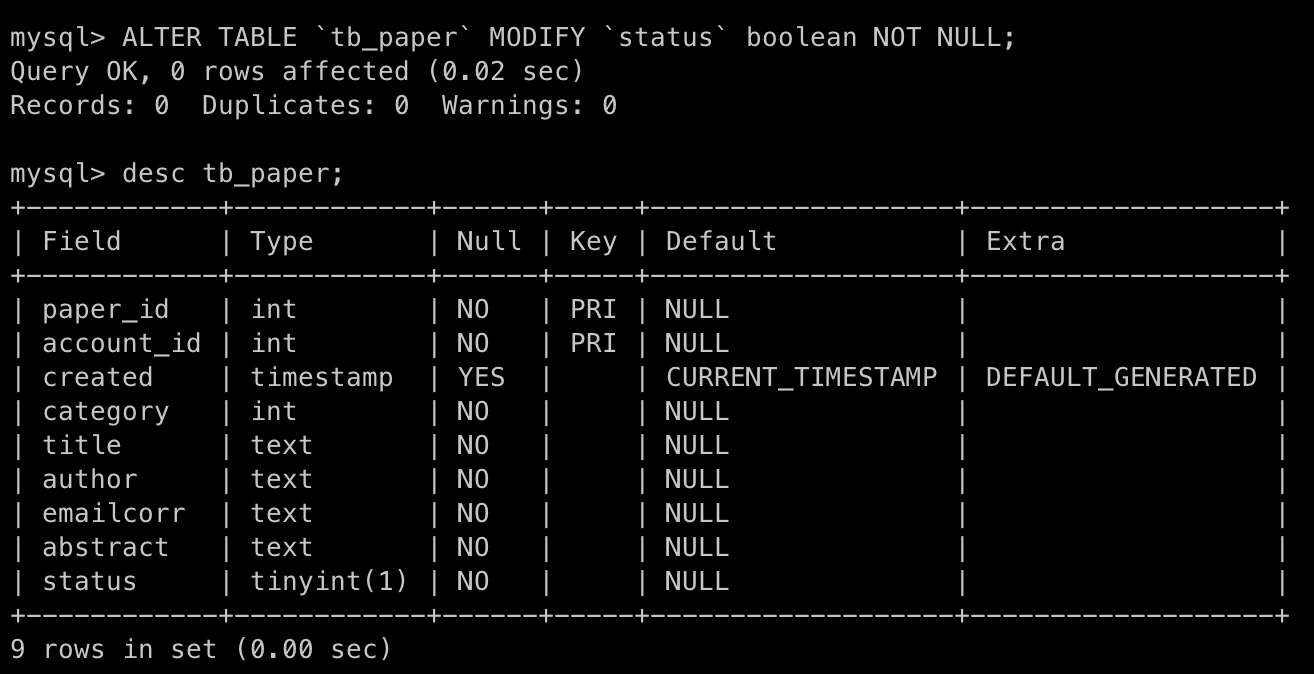
Change datatype of attribute named status from int(11) to boolean using command
ALTER TABLE `tb_paper` MODIFY `status` boolean NOT NULL;
So as you can see from the image below, the datatype of attributes named status is a datatype named tinyint(1) is not boolean.
We can acceptable the datatype named tinyint(1) because this datatype respresents to the integer 1 bit wide size so like a boolean that have only 0 (false) and 1 (true).
Add columns
ALTER TABLE `tb_paper` ADD `comment` VARCHAR(60) AFTER `abstract`;
From the command above, it mean to change structure of the table named tb_paper by create new attribute named comment that has VARCHAR(60) datatype then insert new attribute after attribute named abstract
Result :
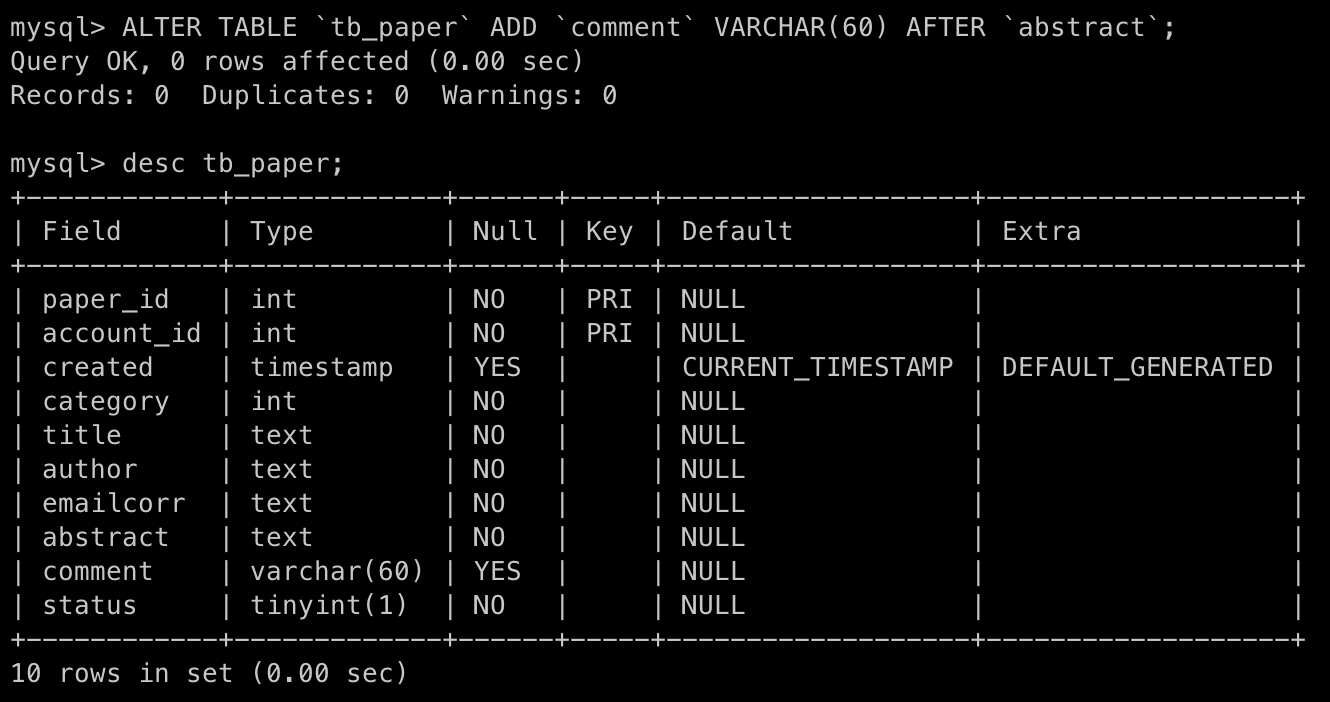
Table named 'tb_category'
Create table
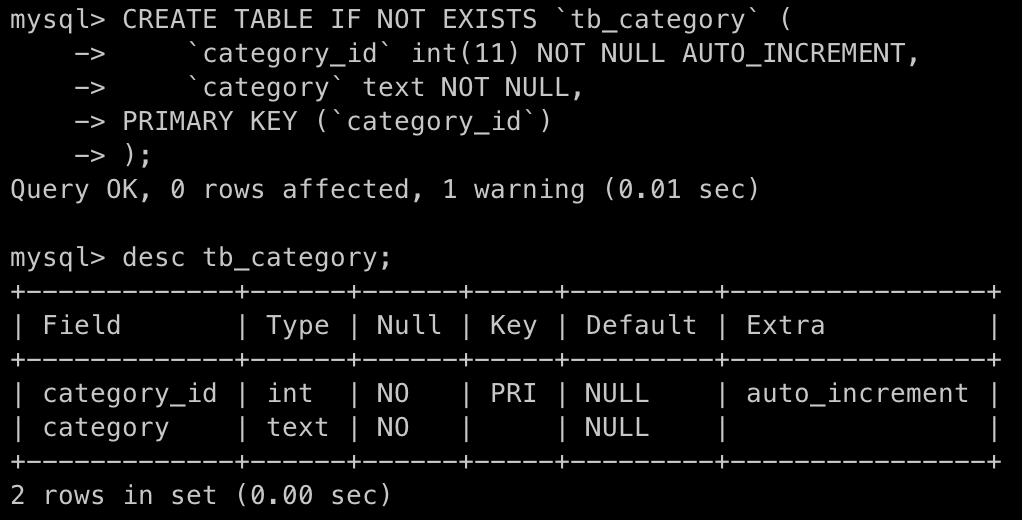
Create a table named tb_category with two attributes; category_id and category . The primary key is category_id and its data type is int(11) with AUTO_INCREMENT . And the data type of category is TEXT
CREATE TABLE IF NOT EXISTS `tb_category` (
    `category_id` int(11) NOT NULL AUTO_INCREMENT,
    `category` text NOT NULL,
PRIMARY KEY (`category_id`)
);
Result :
Insert data
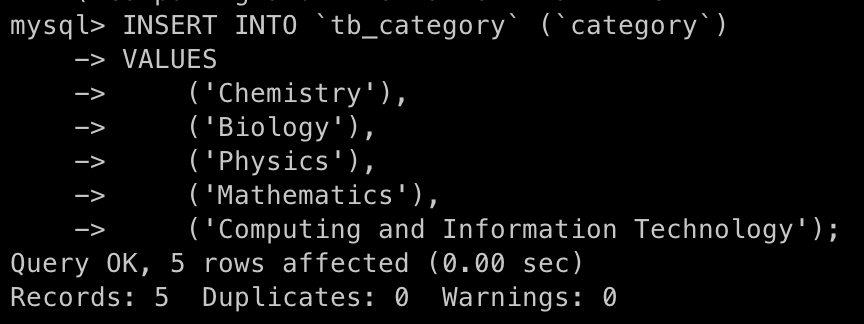
We need to insert the data in to the tb_category by these data
- Chemistry
- Biology
- Physics
- Mathematics
- Computing and Information Technology
using command.
INSERT INTO `tb_category` (`category`)
VALUES
    ('Chemistry'),
    ('Biology'),
    ('Physics'),
    ('Mathematics'),
    ('Computing and Information Technology');
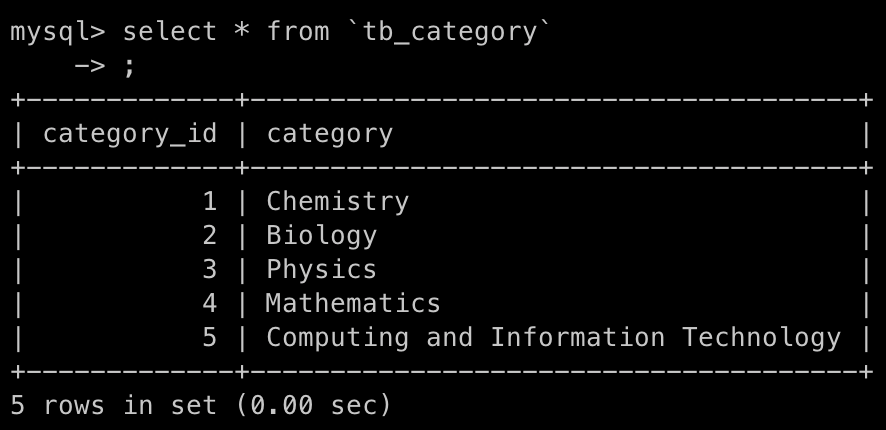
And show all data that contain in this table tb_category by using command
SELECT * FROM `tb_category`;
Result :
Add foreign key constraint
Foreign key in table named 'tb_paper'
Add a foreign key constraint on the category column of tb_paper table which points to the category_id column of the tb_category table using command
ALTER TABLE `tb_paper` ADD FOREIGN KEY (`category`)
REFERENCES `tb_category`(`category_id`);
Add a foreign key constraint on the account_id column of tb_paper table which points to the account_id column of
tb_account table.
ALTER TABLE `tb_paper` ADD FOREIGN KEY (`account_id`)
REFERENCES `tb_account`(`account_id`);
Comamnd execute :
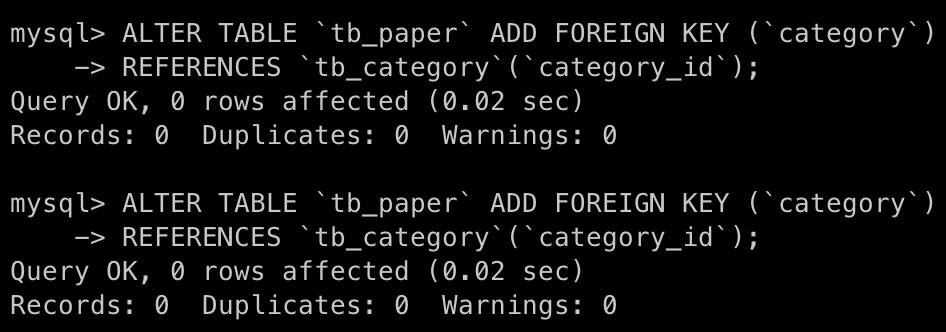
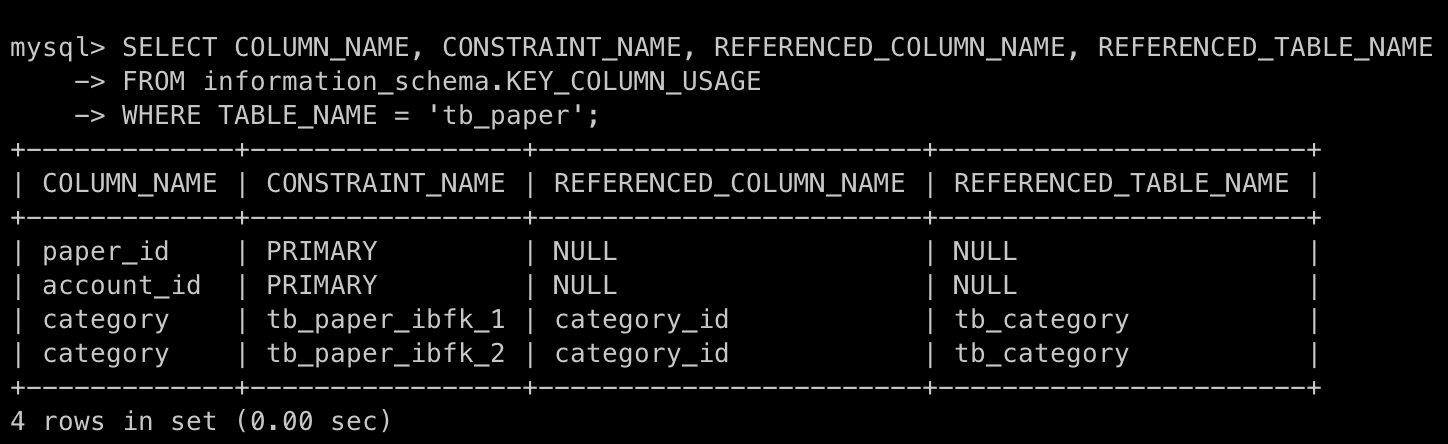
So we can see picture below, this is a table to store data about constraint name for the foreign key that we have link in relationship table which foreign key constraint named is protect actions that would destroy links between tables.
Example :
- Adding a new paper record by category that doesn't exists.
- Update the paper record by category that doesn't exists.
Replace constraint name
Replace constraint_name with the actual constraint name of the foreign key of tb_paper table using command
ALTER TABLE `tb_paper`
DROP FOREIGN KEY `tb_paper_ibfk_1`,
DROP FOREIGN KEY `tb_paper_ibfk_2`,
ADD CONSTRAINT `fk_account_id` FOREIGN KEY (`account_id`) REFERENCES `tb_account` (`account_id`),
ADD CONSTRAINT `fk_category_id` FOREIGN KEY (`category`) REFERENCES `tb_category` (`category_id`);
Command execute :

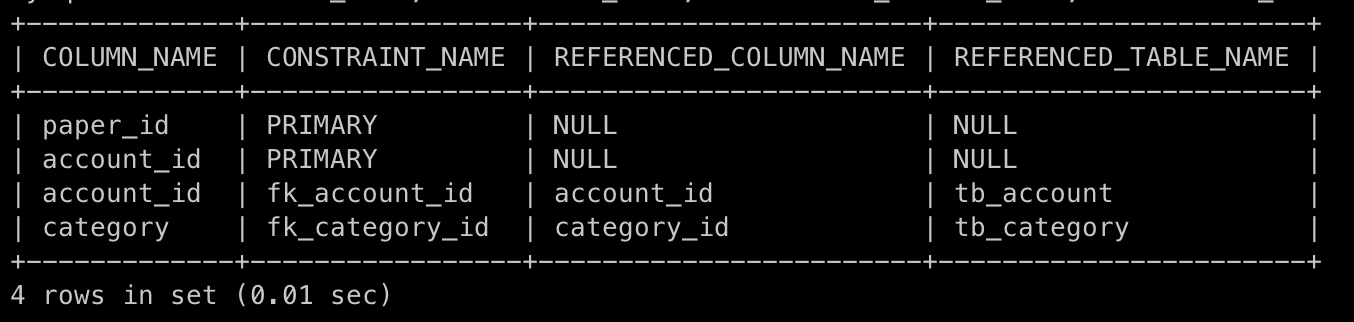
From the command that execute, we can see the the constraint names were tb_paper_ibfk_1,tb_paper_ibfk_2 it change to fk_account_id and fk_category_id that you can see in the picture below.
So, the command above used to change the structure of table named tb_paper by drop the foreign key named tb_paper_ibfk_1 and tb_paper_ibfk_2.
Then, add a new constraint name fk_account_id that is foreign key in attribute named account_id reference to the table named tb_account in attribute account_id.
Next, add a new constraint name fk_category_id that is foreign key in attribute named category reference to the table named tb_category in attribute category_id.
Result :
Insert data
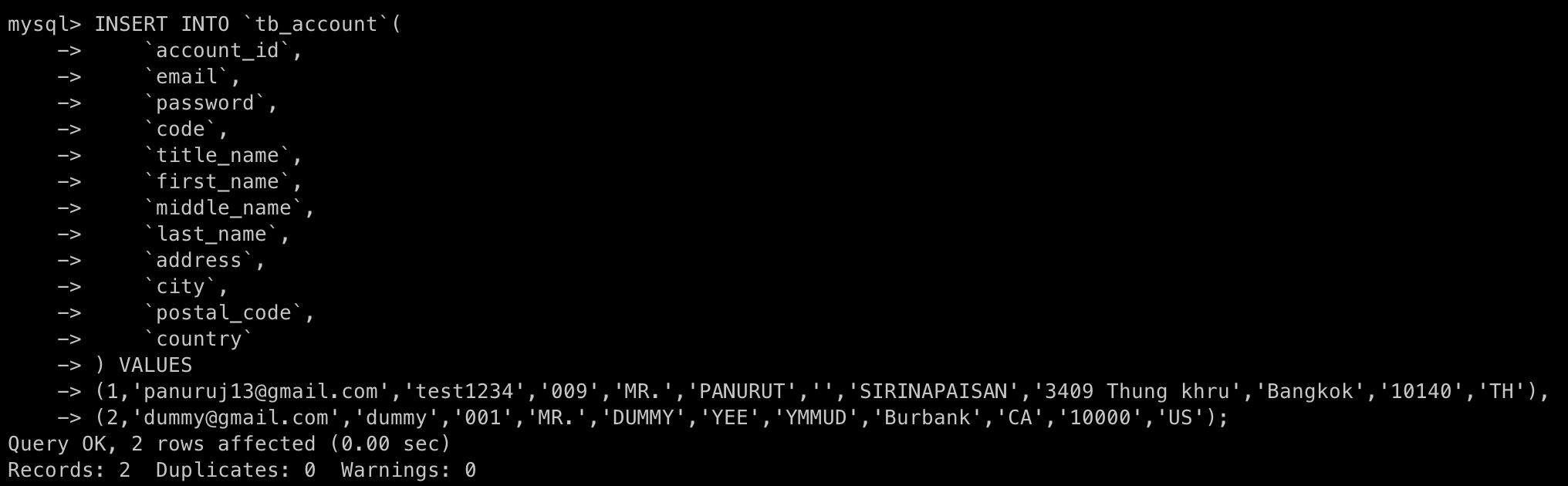
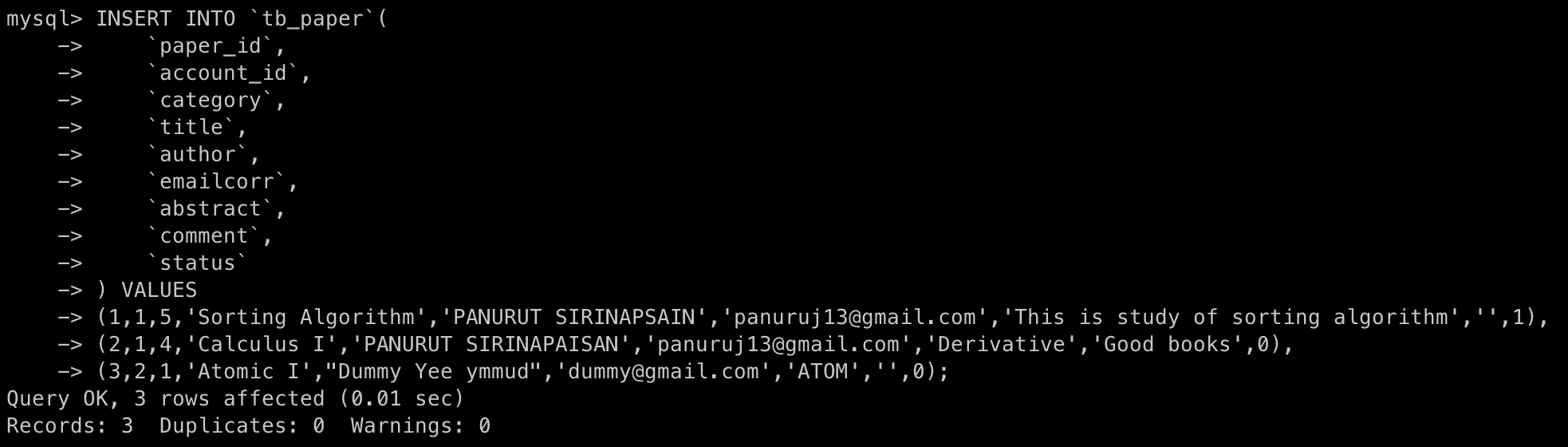
Insert the data in to table tb_account and tb_paper using command
Table tb_account:
INSERT INTO `tb_account`(
    `account_id`,
    `email`,
    `password`,
    `code`,
    `title_name`,
    `first_name`,
    `middle_name`,
    `last_name`,
    `address`,
    `city`,
    `postal_code`,
    `country`
) VALUES
(1,'panuruj13@gmail.com','test1234','009','MR.','PANURUT','','SIRINAPAISAN','3409 Thung khru','Bangkok','10140','TH'),
(2,'dummy@gmail.com','dummy','001','MR.','DUMMY','YEE','YMMUD','Burbank','CA','10000','US');
Command execute:
See the data that insert into the table named tb_account using command
SELECT * FROM `tb_account`;
Result :

Table tb_paper:
INSERT INTO `tb_paper`(
    `paper_id`,
    `account_id`,
    `category`,
    `title`,
    `author`,
    `emailcorr`,
    `abstract`,
    `comment`,
    `status`
) VALUES
(1,1,5,'Sorting Algorithm','PANURUT SIRINAPSAIN','panuruj13@gmail.com','This is study of sorting algorithm','',1),
(2,1,4,'Calculus I','PANURUT SIRINAPAISAN','panuruj13@gmail.com','Derivative','Good books',0),
(3,2,1,'Atomic I',"Dummy Yee ymmud",'dummy@gmail.com','ATOM','',0);
Command execute:
See the data that insert into the table named tb_paper using command
SELECT * FROM `tb_paper`;
Result :

Delete database
So, we can delete the database that store the table and data by using command
DROP DATABASE DATABASE_NAME;
In this moment, I need to delete the database named conference using command
DROP DATABASE `conference`;
Command execute:

That we can see result that I was removed the database to show the databases that exists in systen by using command
SHOW DATABASES;
Result :